

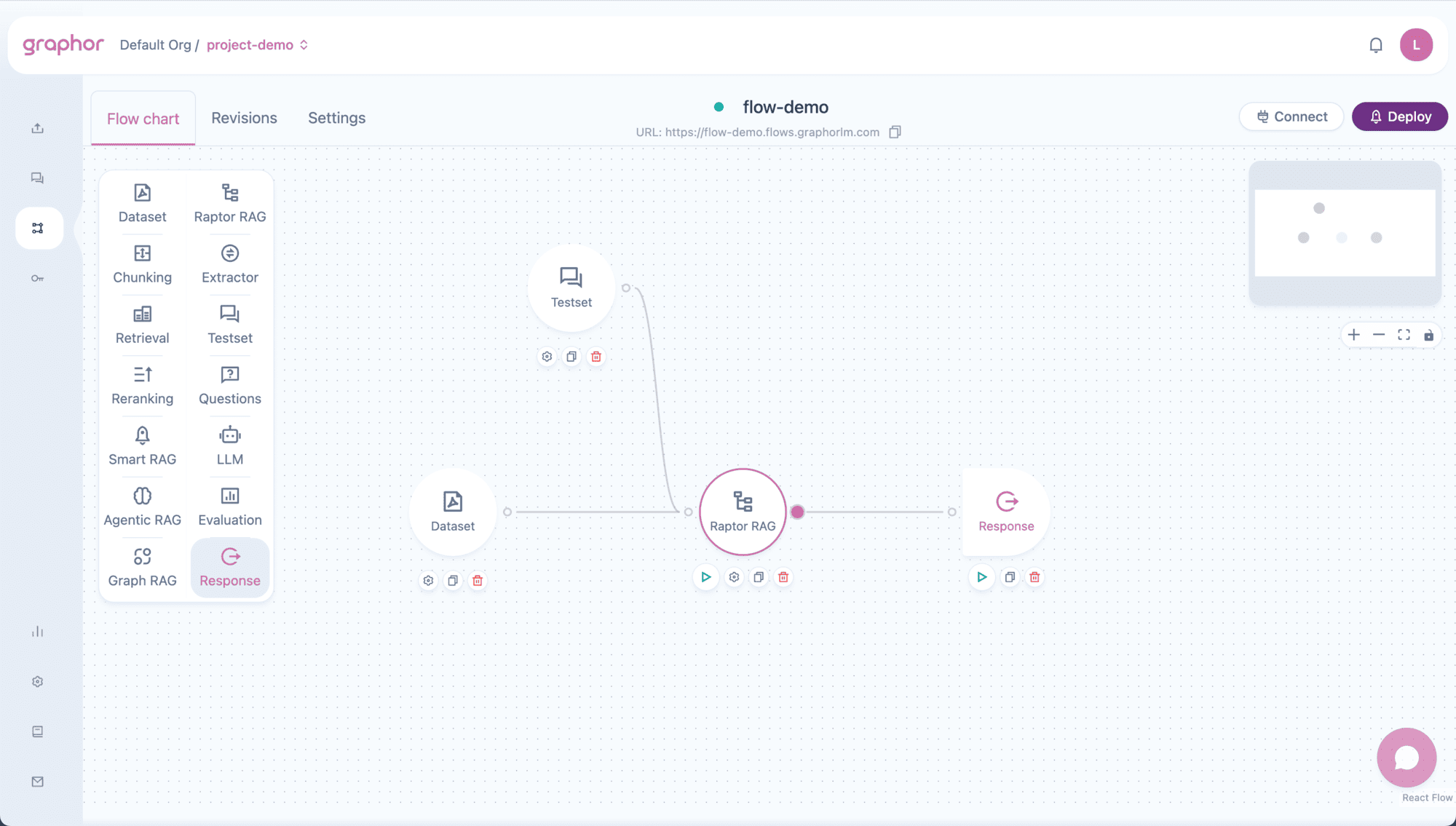
Overview
Raptor RAG (Recursive Abstractive Processing for Tree-Organized Retrieval) creates a multi-level representation of your documents:- Level 0 (Leaves) — Original document chunks with full detail
- Higher Levels — Progressively summarized clusters of related content
- Tree Navigation — Searches traverse from summaries down to specific details
- Better context — Summaries capture themes that individual chunks might miss
- Multi-granularity retrieval — Combines high-level understanding with specific details
- Improved coherence — Related information is grouped together through clustering
When to Use Raptor RAG
Choose Raptor RAG when:- Documents cover multiple related topics that benefit from summarization
- Questions require both high-level understanding and specific details
- You need to understand relationships between document sections
- Document collections are large and benefit from hierarchical organization
- Documents are simple and don’t need hierarchical summarization
- You need faster processing (Raptor RAG requires more computation)
- Questions only need specific facts without broader context
Configuration Options
Double-click the Raptor RAG node to open settings: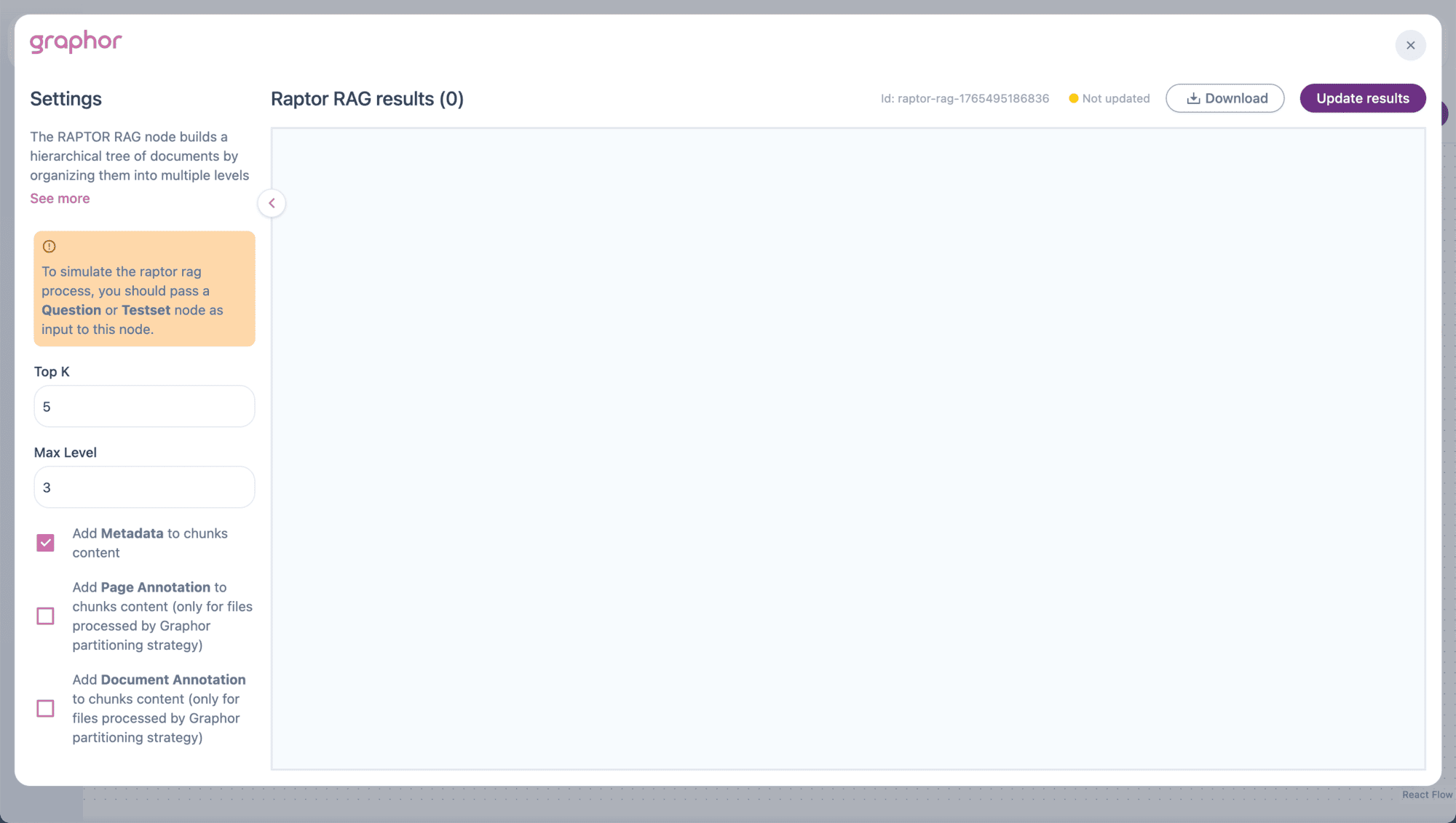
Top K
Number of results to return per query (1-100).| Value | Use Case |
|---|---|
| 3-5 | Focused answers with key information |
| 6-10 | Balanced coverage for most questions |
| 10+ | Comprehensive retrieval for complex topics |
Max Level
Maximum depth of the hierarchical tree (1-10).| Value | Description |
|---|---|
| 2-3 | Shallow tree, faster processing, less summarization |
| 4-5 | Balanced depth for most document collections |
| 6+ | Deep tree for large collections with many sub-topics |
Higher max levels require more processing time as the system must cluster and summarize at each level.
Add Metadata
When enabled, includes document metadata (file name, page number, etc.) in the chunk content. This helps the LLM understand the source context when generating responses.Add Page Annotation
Includes page-level annotations in chunk content. Only works with documents parsed using the Graphor method.Add Document Annotation
Includes document-level annotations in chunk content. Only works with documents parsed using the Graphor method.How Raptor RAG Works
Tree Building Phase
- Chunking — Documents are split into chunks (Level 0)
- Embedding — Each chunk is converted to a vector
- Clustering — Similar chunks are grouped together
- Summarization — Each cluster is summarized by an LLM
- Repeat — Summaries become the next level, process repeats up to Max Level
Retrieval Phase
- Query — User question is embedded
- Top-down Search — Starts at the highest level (summaries)
- Tree Traversal — Follows relevant branches down to leaf chunks
- Result Combination — Combines information from all relevant levels
Pipeline Connections
Input Nodes
| Source Node | Purpose |
|---|---|
| Dataset | Provides documents for tree building |
| Question | Single query for testing |
| Testset | Multiple queries for evaluation |
Output Nodes
| Target Node | Purpose |
|---|---|
| Reranking | LLM-based reordering of results |
| LLM | Generate natural language responses |
| Analysis | Evaluate retrieval quality |
| Response | Output results directly |
Pipeline Examples
Basic Raptor RAG Pipeline
Raptor RAG with Reranking
Evaluation Pipeline
| Node | Connection |
|---|---|
| Dataset | → Raptor RAG |
| Testset | → Raptor RAG |
| Raptor RAG | → Analysis |
Viewing Results
After running the pipeline (click Update Results):- Go to the Results tab
- View retrieved documents organized by question
- Each result shows:
- Content — Combined text from multiple tree levels
- Score — Relevance score
- Level information — Which tree levels contributed to the result
Understanding Multi-Level Results
Results from Raptor RAG combine information from different tree levels:- High-level summaries provide thematic context
- Leaf-level chunks provide specific details
- Combined text is formatted to show which level each part came from
Comparison with Other RAG Nodes
| Feature | Raptor RAG | Smart RAG | Graph RAG | Agentic RAG |
|---|---|---|---|---|
| Hierarchical structure | ✅ Tree levels | ❌ Flat | ✅ Knowledge graph | ❌ Flat |
| Automatic summarization | ✅ Per cluster | ❌ No | ❌ No | ❌ No |
| Processing time | Slower | Fast | Slower | Fast |
| Best for | Multi-topic docs | General use | Entity relationships | Adaptive queries |
| Configuration | Top K, Max Level | Top K, annotations | Top K, annotations | None |
Best Practices
Document Preparation
- Use quality parsing — Better parsing leads to better chunking and summarization
- Consider document size — Very large documents may benefit from higher Max Level
- Related content — Raptor RAG works best when documents have related sub-topics
Configuration Tips
- Start with defaults — Max Level 3, Top K 5 works for most cases
- Increase Max Level for larger document collections
- Enable annotations if documents were parsed with Graphor method
- Test with representative questions to validate tree structure
Performance Optimization
- Reduce Max Level if processing is too slow
- Limit dataset size during initial testing
- Use Testset for systematic evaluation before deployment
Troubleshooting
No results showing
No results showing
If Raptor RAG returns no results:
- Verify a Question or Testset node is connected
- Check that Dataset contains processed documents
- Ensure documents have status “Processed”
- Wait for tree building to complete (may take longer than other RAG types)
Very slow processing
Very slow processing
Tree building requires clustering and LLM summarization at each level:
- Reduce Max Level for faster processing
- Reduce number of documents in Dataset
- Consider Smart RAG for faster alternatives
- Processing time scales with document volume and Max Level
Poor quality summaries
Poor quality summaries
If summaries don’t capture document themes well:
- Check that documents are properly parsed
- Verify document content is coherent and well-structured
- Consider using documents with clearer topic organization
Too few levels in tree
Too few levels in tree
If the tree has fewer levels than Max Level:
- This is normal when document volume is small
- Clustering stops when clusters become too small
- Add more documents or reduce Max Level expectation
Annotations not working
Annotations not working
If page/document annotations don’t appear:
- Verify documents were parsed with Graphor method
- Enable the corresponding checkbox in settings
- Reprocess documents with Graphor if needed
Next Steps
Smart RAG
Simpler RAG without hierarchical summarization
Graph RAG
Knowledge graph-enhanced retrieval
Reranking
Add LLM-based reranking for better results
Evaluation
Measure retrieval quality with metrics